Your course, from the plan to every lesson.
You know what's on tomorrow in each class, and with what material.
Launch on 1 February 2027
Until then, Aunova is in private beta, by invitation.- 1Your content treeThe blocks and concepts of each subject, just as you teach it: the index of everything you prepare.
- 2Prepare it onceCourse plans, units, exams and material, each piece tagged with your tree.
- 3Always to handFind it by year, unit or concept, and reuse it or adapt it in no time.
- 4Easier every yearThe more you use Aunova, the less work it takes: next year you start from everything you already have.
Features
You plan your subject, spread it over the real calendar and know whether you will reach the end of the year. Each lesson has its material and its exam, without starting from scratch.
Pick a group and then a feature to see what you can do with it and try it, with a tutorial to guide you.
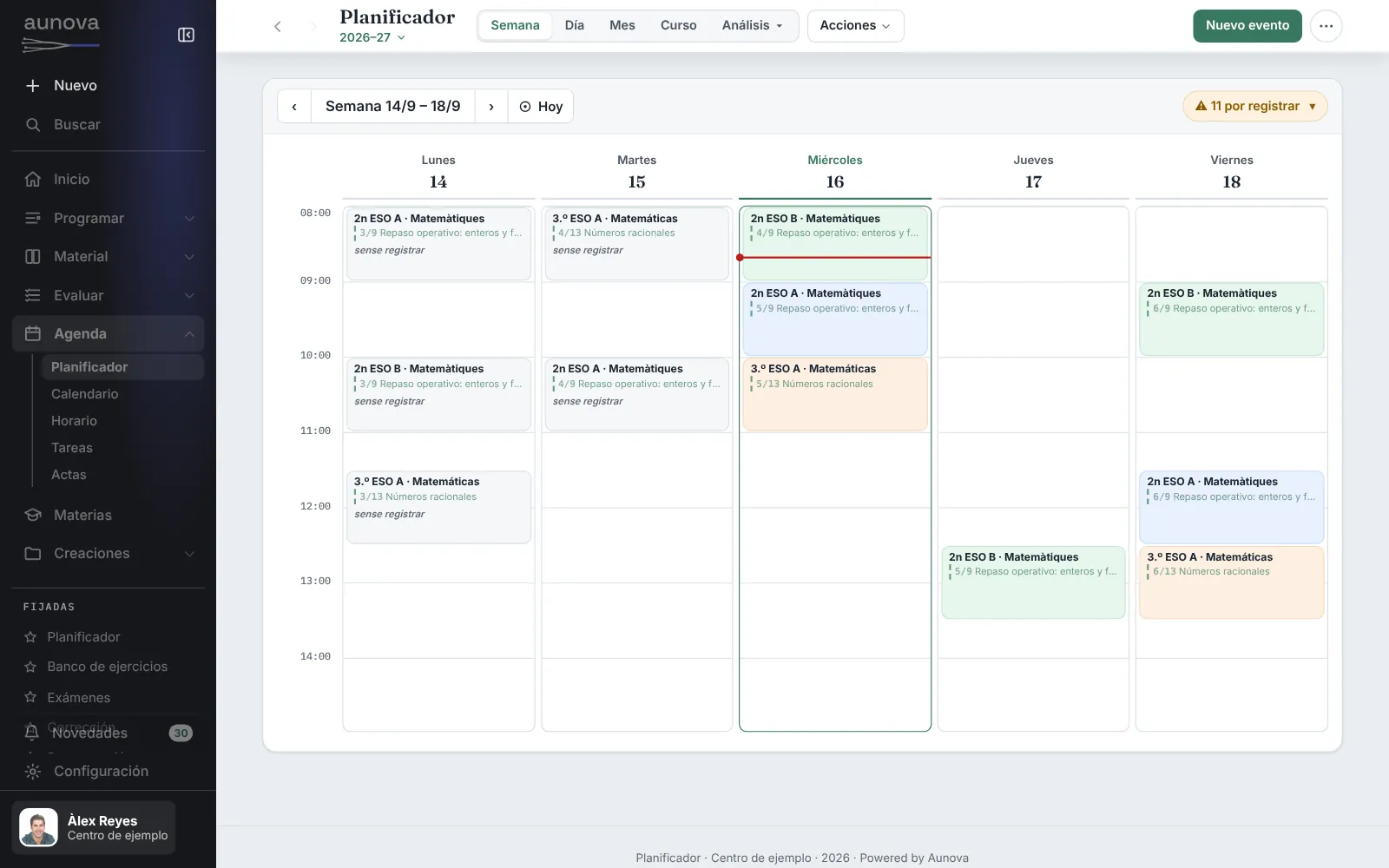
Planner
Your lessons day by day, each with its sheet.
What you can do
- See the day's and the week's planner, built from your timetable and the course plan
- Open a lesson and mark whether it was done, half done or not
- Note the concepts covered and what you did
- Set homework, material or an exam that goes straight to the group
Tasks
What you need to do, with date and priority.
Content tree
The blocks and concepts of each subject: the index of everything you prepare.
What you can do
- Create a subject's tree: its blocks and its concepts
- Reorder it and change it whenever you like
- Tag units, exercises, notes and exams with it
Course plan
The units and content of each subject.
What you can do
- Create the course plan for a subject
- Upload a course plan you already have
- Detail each unit: content, methods and sessions
- Export the course plan, whole or in part
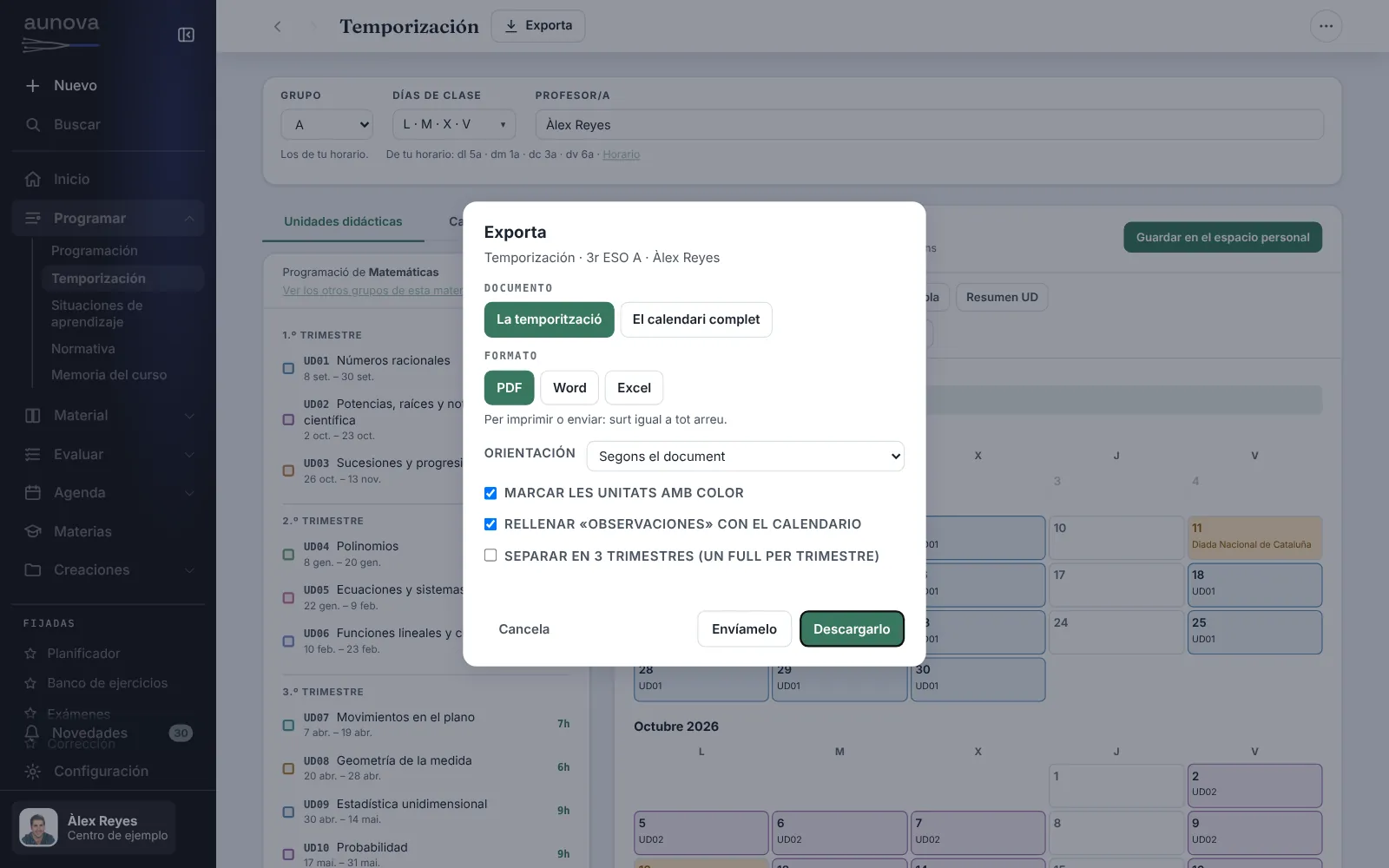
Scheduling
How many lessons each unit has and when they fall.
What you can do
- Choose the year, the group and the class days
- Spread the units over the school days, with holidays and breaks
- Preview each week with its unit and its deviations
- Export to Excel, Word or PDF
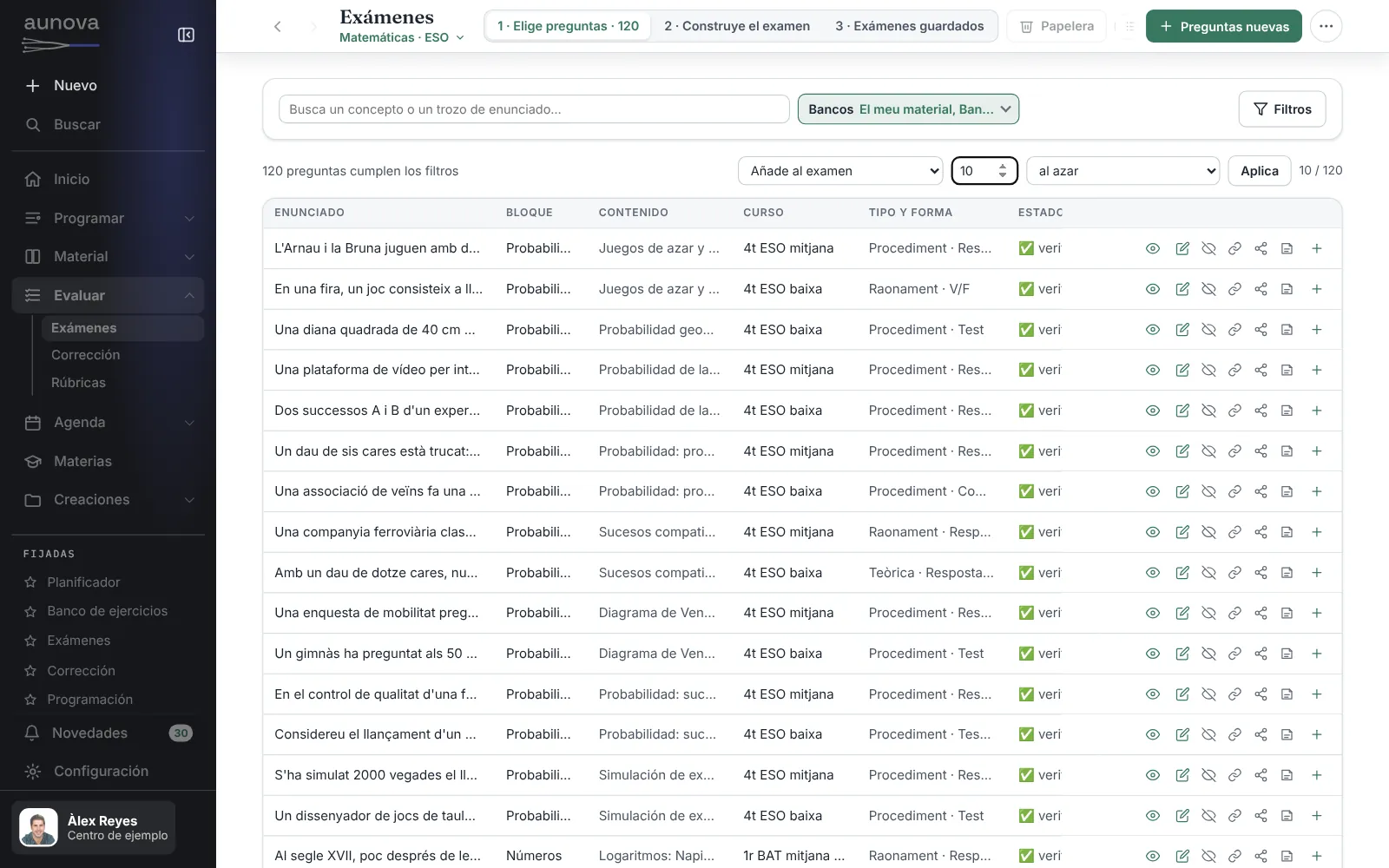
Exams
Generates the test, solves it and brings it to you printed.
What you can do
- Filter the bank by year, block, concept, source or type
- Ask for random questions or add them one by one
- Put the exam together: order, points, answer space and versions A and B
- Get the version with solutions from the same layout
Mark a test
A closed test's answers and what they show. Nothing is stored.
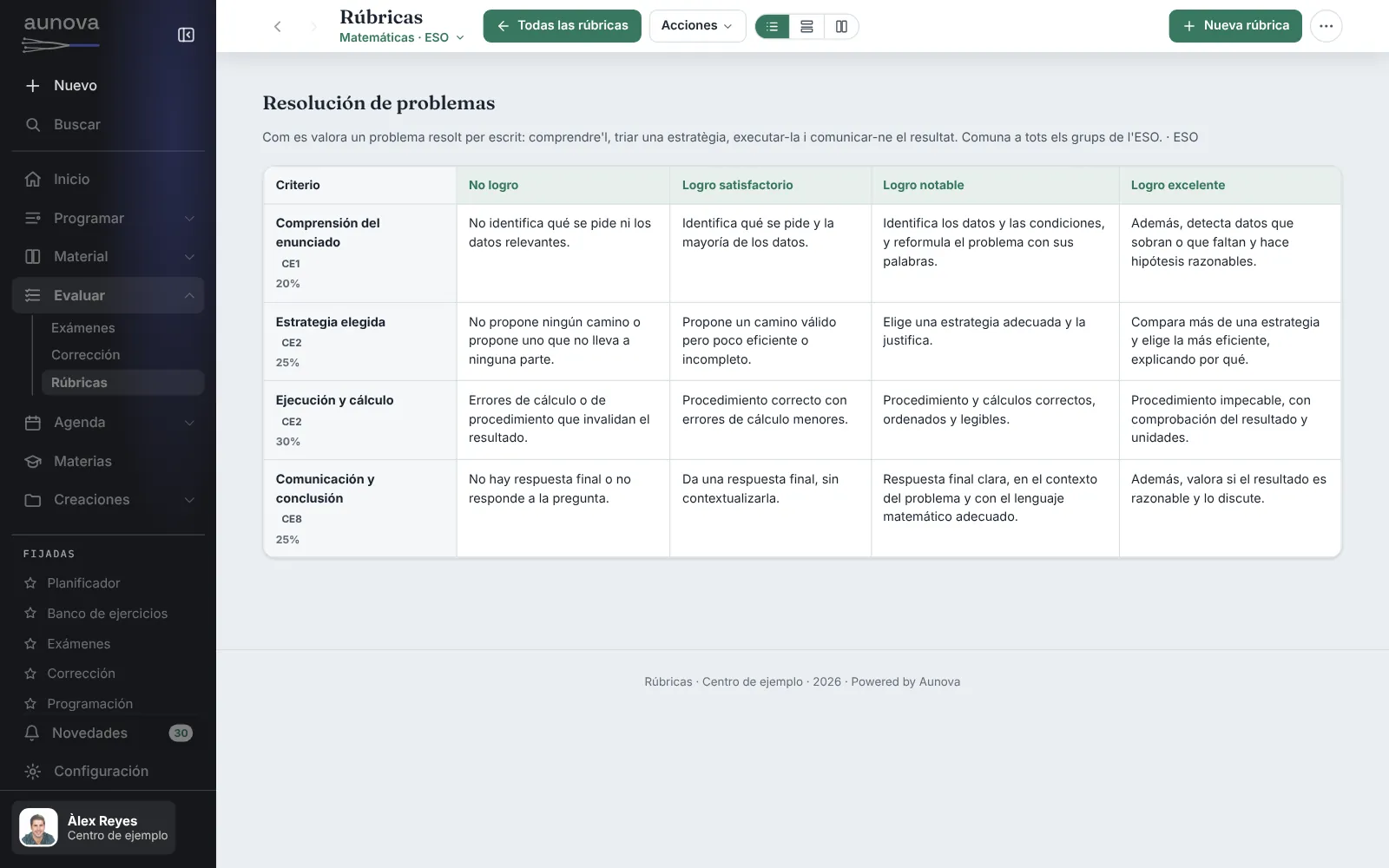
Rubrics
Criteria and levels: what should be seen in each cell.
What you can do
- Create a new rubric from a template
- Adjust criteria, weight and levels
- Use it when marking and printing, the same in all your groups
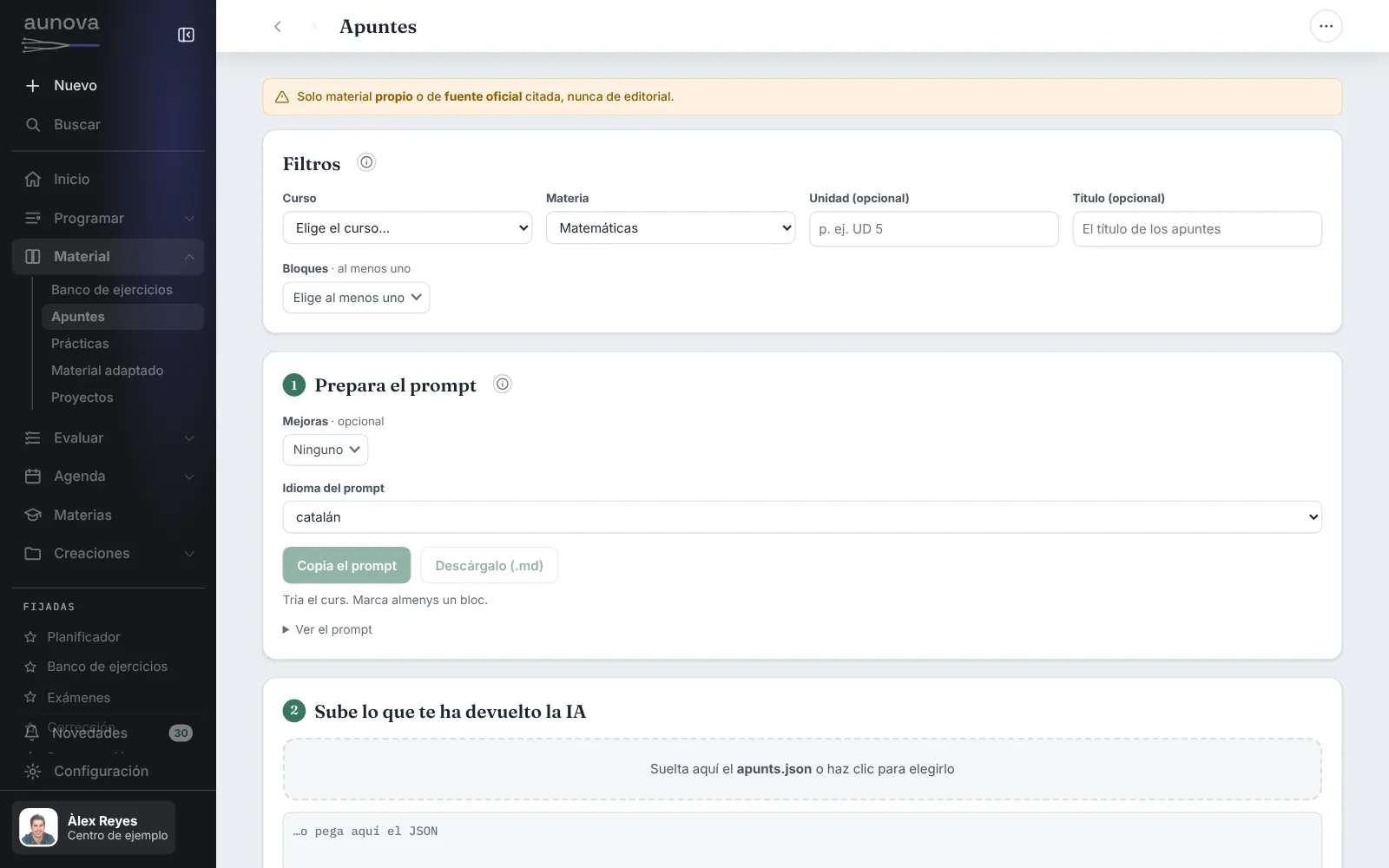
Notes
Your notes in reusable sections.
What you can do
- Turn your PDF or PowerPoint notes into reusable sections
- Copy the prompt with your content tree's concepts for your AI
- Paste what the AI gives back and review sections, blocks and tags
- Upload them to your notes bank
Exercise bank
Exercises sorted by unit and type.
Practicals and worksheets
Equipment, steps and safety for each practical.
Projects
A project's challenge, plan, deliverables and assessment.
Classroom activities
Short activities, thinking routines and games.
Manipulatives
Cut-outs, templates and boards to print or build.
Digital materials
GeoGebra, videos, Kahoot, Edpuzzle… all in one place.
Course setup
The calendar, your classes, the periods and the timetable.
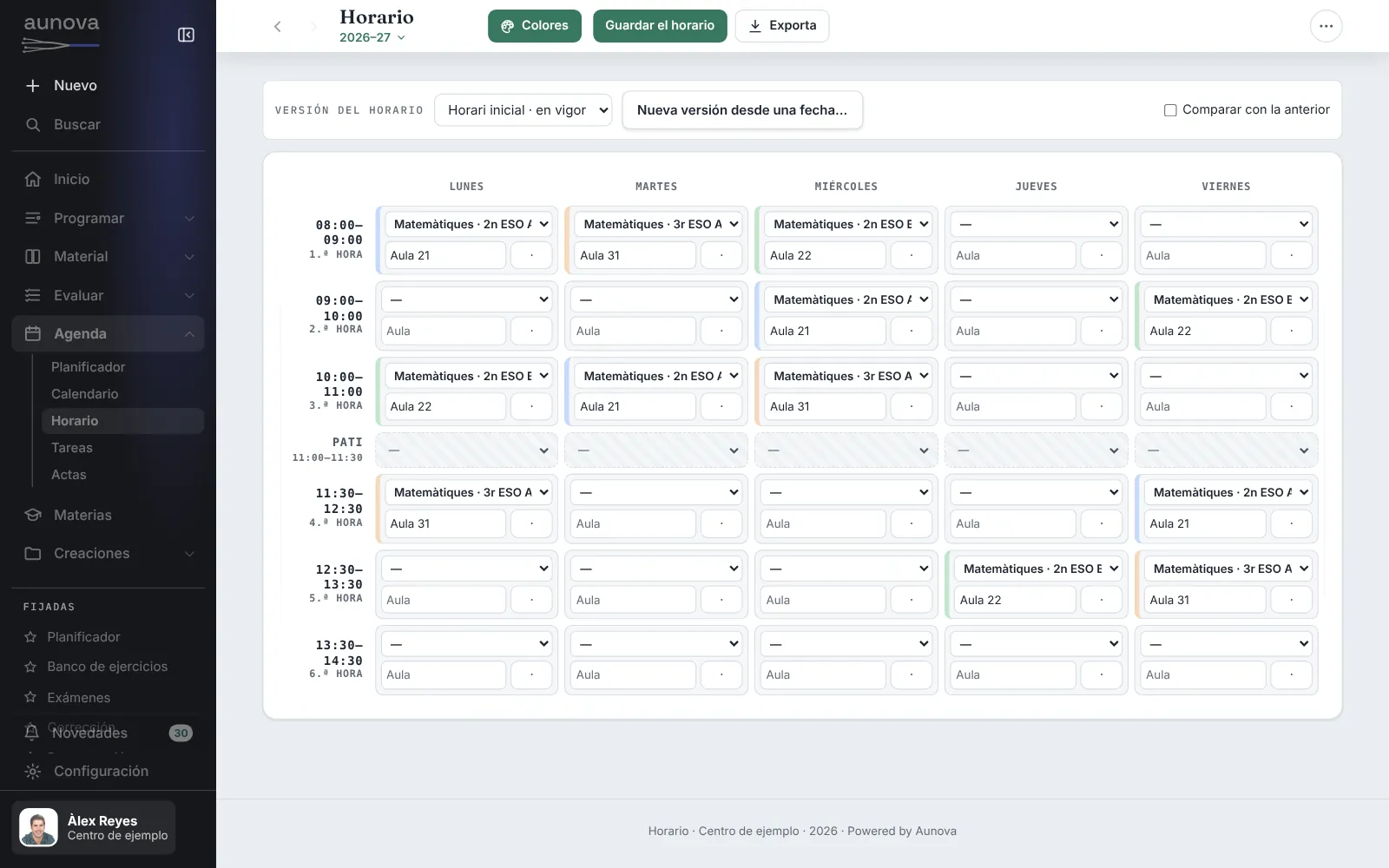
Timetable
Your week. The planner comes from here.
What you can do
- See which group and which subject is on each hour of the week
- See the classroom for each class
- Build the week's planner automatically when you save it
Timeline
Holidays, assessments and trips for the whole year.
Minutes
From the meetings you attend: write them, import them and export them.
My creations
All the materials you have made, of every type, in a single list.
Shared material
What other teachers send you, and what you send.
AI connector
Prepare material with your own AI, tagged with your content tree.
Your space is yours
What you prepare is yours and, if you change schools, it stays with you.
The screenshots and demos show the edition for Spain, with sample data from a fictitious school: the year groups, the curriculum and the Aunova Bank exercises that appear are the ones used there, and they may contain pedagogical simplifications.
Is Aunova available in your country?
From launch, on 1 February 2027, Aunova will be available in Spain and in these 30 countries:
- Andorra
- Argentina
- Australia
- Belgium
- Bolivia
- Brazil
- Canada
- Chile
- Colombia
- Costa Rica
- Dominican Republic
- Ecuador
- El Salvador
- France
- Guatemala
- Honduras
- Ireland
- Italy
- Luxembourg
- Mexico
- New Zealand
- Panama
- Paraguay
- Peru
- Portugal
- Puerto Rico
- Switzerland
- United Kingdom
- United States
- Uruguay
If your country is not on the list, Aunova is not available there yet.
The same Aunova, in your country
Outside Spain, Aunova is the same platform, with the same tools. This is what changes and what it does not have yet.
You work with your content tree
Aunova does not yet include your country's official curriculum. You organise each subject with your own content tree or with the tree of an Aunova subject, and you change it whenever you like.
Each country's content, in preparation
We are preparing content trees based on each country's official syllabuses. They are not available yet: we will publish them country by country, once they have been reviewed.
Primary and secondary
For primary and secondary teachers, of any subject.
Your exercise bank
You upload your exercises and classify them with your tree. The Aunova Bank, with ready-made exercises, starts in Spain only and will gradually open to other countries.
For each teacher
Outside Spain, Aunova is for teachers, each with their own account. There is no edition for schools or institutions.
Eight languages
The platform, in English, Spanish, Catalan, Basque, Galician, French, Italian and Portuguese from launch. Support, in Spanish, Catalan and English.
Do you teach in Spain? There, Aunova works with the official curriculum: aunova.es.
AI, to bring in what you already have
If you use AI, your course plans, notes, exercises and exams come into Aunova without being rewritten. Your AI transfers them to the platform, tagged with your content tree: you find them by year, unit or concept. Nothing goes into your bank until you review it.
With Aunova's instructions
You copy Aunova's prompt into the AI you use and paste the result into Aunova.
By connecting your AI to Aunova
Today, with Claude, ChatGPT or Gemini (MCP). What it prepares waits for you in an Aunova inbox.
The AI is your own: Aunova neither includes it nor charges for it.
Roadmap
Until 1 February 2027, Aunova is in private beta. That day is the launch.
- Now · private beta
Aunova is in private beta, by invitation, and with Spain's curriculum. We are preparing the platform for teachers in other countries.
- 1 February 2027 · Launch
Aunova opens on the same day in Spain and in 30 other countries. Outside Spain, it is for primary and secondary teachers. You start with Aunova Gratis, with no card and no expiry date, and if you want to work with all your classes, you move to Aunova.
- 31 August 2027
Last day to get the founder price, while places last: 1,000 on Aunova and 1,000 on Aunova Plus.
Prices
The plans begin on 1 February 2027. All three include every Aunova feature: what changes is how many classes you bring and how much you use it. The way to try it is Aunova Gratis, with no card and no expiry date.
Aunova Gratis
All of Aunova, with one class.
What you can do
- Every Aunova feature
- With one subject and one of your groups
- Download all your work once a month (a ZIP with Word, Excel and the PDFs you have already made)
Usage limits
- AI connector: 10 proposals a month, with your own AI
- Create up to 10 PDFs a month
- Download up to 100 documents in Word or Excel a month
- Save up to 10 of each document (exams, notes, plans…) and 100 of each bank (exercises, notes sections, events…)
- 100 MB for your files
- Send or share material up to 5 times a month
Aunova
Your teaching work on one platform.For a teacher's day-to-day.
What you can do
- Every Aunova feature
- With all your subjects and all your groups
- Download all your work once a month (a ZIP with Word, Excel and the PDFs you have already made)
Usage limits
- AI connector: 150 proposals a month, with your own AI
- Create up to 80 PDFs a month
- Download up to 1,000 documents in Word or Excel a month
- 2 GB for your files
- Send or share material up to 60 times a month
- Save everything you make: no limit on documents or exercises (only on file storage)
Aunova Plus
The same platform, with more capacity.For those who use it in depth.
What you can do
- Every Aunova feature
- With all your subjects and all your groups
- Download all your work once a month (a ZIP with Word, Excel and the PDFs you have already made)
Usage limits (much higher)
- AI connector: 600 proposals a month, with your own AI
- Create up to 250 PDFs a month
- Download up to 3,000 documents in Word or Excel a month
- 10 GB for your files
- Send or share material up to 200 times a month
- Save everything you make: no limit on documents or exercises (only on file storage)
You are a founder if you start paying for Aunova or Aunova Plus by 31 August 2027, while places last (1,000 on Aunova and 1,000 on Aunova Plus), and you keep a 25% discount on the standard price for as long as you keep paying, including if you switch between plans or move to Aunova Archive.
A proposal is each item your AI leaves in Aunova for you to review (some exercises, some notes, a scheme of work…); reading does not count. The AI is your own: Aunova neither includes it nor charges for it.
If you pay and change your mind, you have 14 days from payment to withdraw and you get the full amount back.
Prices and terms in force as of 7 November 2026. They may change: we will give you at least 30 days' notice, a period you have already paid for never changes and, if you do not agree, you can cancel at no cost before the change applies. Usage limits may also change, with the same notice.
The price is the same in every country. We will confirm the currency you are charged in and the taxes that apply in each country before launch.
Questions
Can I use it in my country?
From launch, in Spain and in the 30 countries on the list. If yours is not there, Aunova is not available there yet.
Does it include my country's curriculum?
Not yet. You work with your own content tree or with the tree of an Aunova subject. We are preparing trees based on each country's official syllabuses and will publish them once they have been reviewed.
Which stages?
Primary and secondary.
What language is it in?
From launch, in English, Spanish, Catalan, Basque, Galician, French, Italian and Portuguese. Support is in Spanish, Catalan and English.
Does it replace my gradebook?
No. Aunova is where you prepare the year and your lessons. Grades and attendance stay in the gradebook or platform you already use.
Do I need an AI?
No. Everything can be done by hand. If you use one, it helps you upload what you already have: with Aunova's instructions or by connecting it directly (currently, Claude, ChatGPT or Gemini). Nothing goes into your bank until you have reviewed it.
Can my school use it?
Outside Spain, Aunova is for teachers only, each with their own account: there is no edition for schools or institutions.
How much does it cost?
Aunova Gratis costs nothing and never expires: you get all of Aunova with one subject and one of your groups. Aunova, with all your subjects and groups, costs €19.99 a year, and Aunova Plus, with more capacity, €39.99 a year. Until 31 August 2027, the first 1,000 Aunova subscriptions and the first 1,000 Aunova Plus subscriptions get the founder price: €14.99 and €29.99.
I teach in Spain. Is this my website?
No: yours is aunova.es, where Aunova works with Spain's official curriculum.